
OCR vs. Computer Vision Models: How to Choose the Right Technology for Your Software?

Mary CAZANOVE
Software publishers often need to integrate image or document analysis features. Two technologies stand out: OCR (Optical Character Recognition) with AI and Vision Models (LLM). But what’s the difference, and most importantly, which one should you choose for your solution?
At Agora Software, we help software and platform publishers integrate agents seamlessly. Here’s what you need to know to make the right choice.
OCR with AI: Extract text, simply and efficiently
What is it for ?
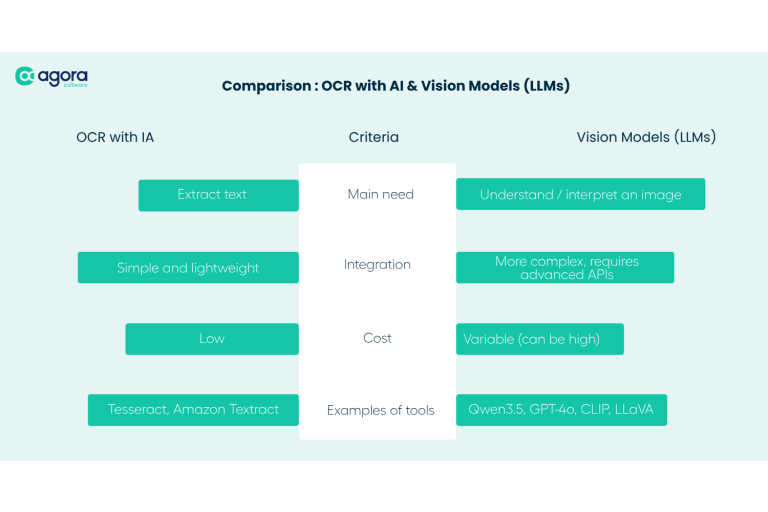
OCR allows you to digitize text from images, PDFs, or scanned documents. Thanks to AI, modern tools (such as Tesseract or Google Vision OCR) achieve high accuracy, even with handwritten text (a real challenge) or low-quality documents.
Use cases for publishers
Automated Data Entry : Extract data from invoices, contracts, or forms to integrate directly into your software.
Full-Text Search : Make scanned documents (e.g., archives, handwritten notes) searchable.
Quick Integration : Add a scanning feature to your application without developing a complex model.
Limitations
No Text Understanding : OCR extracts words but does not interpret them.
Quality-Sensitive : Blurry or poorly lit documents can reduce accuracy.
Vision-Language Models (LLM) : Understanding and interpreting images
What is it for ?
Vision models (such as Qwen3.5, GPT-4o, CLIP, or LLaVA) go far beyond text extraction. They analyze the visual and textual content of an image to provide descriptions, answer questions, or even reason about the context.
Use cases for publishers
Automatic Description : Generate captions for images (e.g., “A screenshot of your software to illustrate a possible action”).
Contextual Assistance : Answer questions about an image uploaded by a user (e.g., “What is the model of this medical equipment?”).
Data Enrichment : Automatically classify images based on their content (e.g., categorizing product photos in a catalog within an ERP or PLM).
Complex Document Analysis : Interpret user guides containing text, diagrams, screenshots, and tables.
Limitations
Technical Complexity : Requires more resources and a more advanced integration.
Cost : Advanced models can be expensive to use at scale.
OCR or Vision LLM : How to choose ?
When to prioritizeOCR ?
You need to digitize documents (invoices, contracts, forms).
Your priority is simplicity and speed of integration.
Your budget is limited.
When to opt for a vision model ?
You want to analyze or describe images (e.g., product photos, screenshots, or documents containing both text and images).
You want to offer a rich user experience (e.g., a conversational agent that can discuss an uploaded image).
You have the technical resources to manage complex products.
Combining OCR and vision models : the best of both worlds ?
Why combine both ?
OCR is excellent for quickly and cost-effectively extracting text.
Vision models allow you to understand and interpret visual and textual content, providing a richer user experience.
Example of an agentic workflow
OCR extracts text from a document (e.g., a proof or user guide).
The vision model analyzes visual elements (diagrams, screenshots, tables) and relates them to the extracted text.
The agent uses this information to answer complex questions, guide the user, or automate tasks.
Business use cases
Customer Support : An agent capable of understanding both text and images in a user guide to provide precise answers.
Process Automation : Extracting textual and visual data to feed business workflows (e.g., proof validation, technical plan analysis, purchase order).
Integrating OCR or vision models into your product
Technical patterns
Integrating OCR and vision models into a SaaS relies on proven patterns : asynchronous services, message queues, storage of visual and textual artifacts, and detailed logging for auditing and support.
A common pattern is to expose a single entry point in your API (“document-intake”) that :
Receives an image or PDF,
Creates a folder ID,
Stores the original,
Then triggers an asynchronous workflow.
Your OCR, vision, and business microservices then consume tasks from a queue and progressively enrich this folder.
On the interface side, always provide visual feedback on what has been understood. For example, display the original invoice with the areas detected by OCR, the categories interpreted by the vision model, and any alerts. This feedback builds trust, especially for advanced users like your back-office teams or clients.
Common pitfalls
The most frequent pitfalls observed among CRM, ERP, or HRIS publishers are recurring :
Relying on a single “magic” model for all cases, which ends up being expensive and frustrating.
Neglecting data governance (where are images stored? How long are they retained ?).
Forgetting the user feedback loop, when a simple “report a bad extraction” button could fuel your future iterations.
How Agora Software can help ?
Our platform enables software and platform publishers to natively integrate agents capable of :
Processing documents (via OCR) and extracting key information.
Analyzing images (via Vision models) to enrich interactions with your users or simplify their processes.
Automating business workflows by combining text and visuals.
Whether you are a publisher of CRM, ERP, HRIS, or other business software, our solutions adapt to your needs to deliver a smooth and intelligent user experience.
Toward multimodal and autonomous agentic workflows
In summary
- OCR = Ideal for quickly extracting text at a low cost.
- Vision models = Perfect for understanding and interpreting images, with advanced capabilities.
- Combination = The key to increasingly intelligent and intuitive SaaS solutions.
What are the future prospects for OCR and vision models ?
Future agentic workflows combining OCR and vision models will go beyond simple extraction to orchestrate decisions, validations, and end-to-end business actions, leveraging multiple data sources and advanced reasoning capabilities.
Already today, we’re seeing the emergence of multimodal agentic workflows capable of :
- Read a user guide (text + images) and provide proactive assistance within your software.
- Automatically verify the compliance of a ‘print approval’ by comparing the PDF version, the visual mockup, and contractual requirements.
- Monitor a stream of images (screenshots, product photos) and trigger actions when an anomaly is detected.
Tomorrow, these agents will not only be able to interpret what they see and read, but also plan a sequence of actions: request a missing document, suggest a layout correction, recommend a more robust document template, or open a ticket with another team.
For a SaaS software vendor, this is an opportunity to transform a simple document upload module into a true agentic orchestrator—combining OCR, vision models, business rules, and historical data to reduce friction and streamline processes.
By structuring your workflows around these building blocks today, you lay the groundwork for more intelligent, more autonomous, and truly useful user experiences for both technical and business teams.
_____________
Are you a software vendor? We hope this article has helped clarify the differences between OCR and vision models—and, above all, helped you identify the technology best suited to your needs.
Agora Software develops AI solutions designed for software vendors. We support you in quickly and easily integrating agents capable of analyzing text, images, or both, to enhance the user experience of your applications and platforms.
Looking to integrate agents into your applications ?
Let’s talk : contact@agora.software
Enjoyed this article ? You might also like our piece on local inference.
Follow us on LinkedIn to stay up to date with our latest news !


Are you building an application or a SaaS platform and want to integrate high-performance AI agents without delaying your product roadmap ?
Discover how our platform enables you to deploy, maintain, and scale your agents—while continuously benefiting from our innovations and technology watch.